Verifiable Letter helps you design professional business letterhead that can be used to issue almost…
How to Design a Business Letterhead with VerifiableLetter
How to Design a Business Letterhead with VerifiableLetter
A professional business letterhead helps identify your organization and gives your official correspondence a consistent, recognizable appearance. With VerifiableLetter, you can design a business letterhead by choosing one of the available letterhead designs or by uploading your own custom header and footer.
Once configured, your selected letterhead can be used when creating business letters and other official correspondence through VerifiableLetter. Documents would also include verification features that allow recipients to check their authenticity.
This guide explains how to design a business letterhead with VerifiableLetter, select a ready-made design, create a custom design, and preview the finished result.
Before You Design Your Business Letterhead
Before getting started, make sure your organization’s profile contains accurate business information and that you have uploaded your company logo. These details are used in VerifiableLetter’s standard letterhead designs.
If you are new to the platform, learn more about how online letterhead works with VerifiableLetter.
Option 1: Choose a Ready-Made Business Letterhead Design
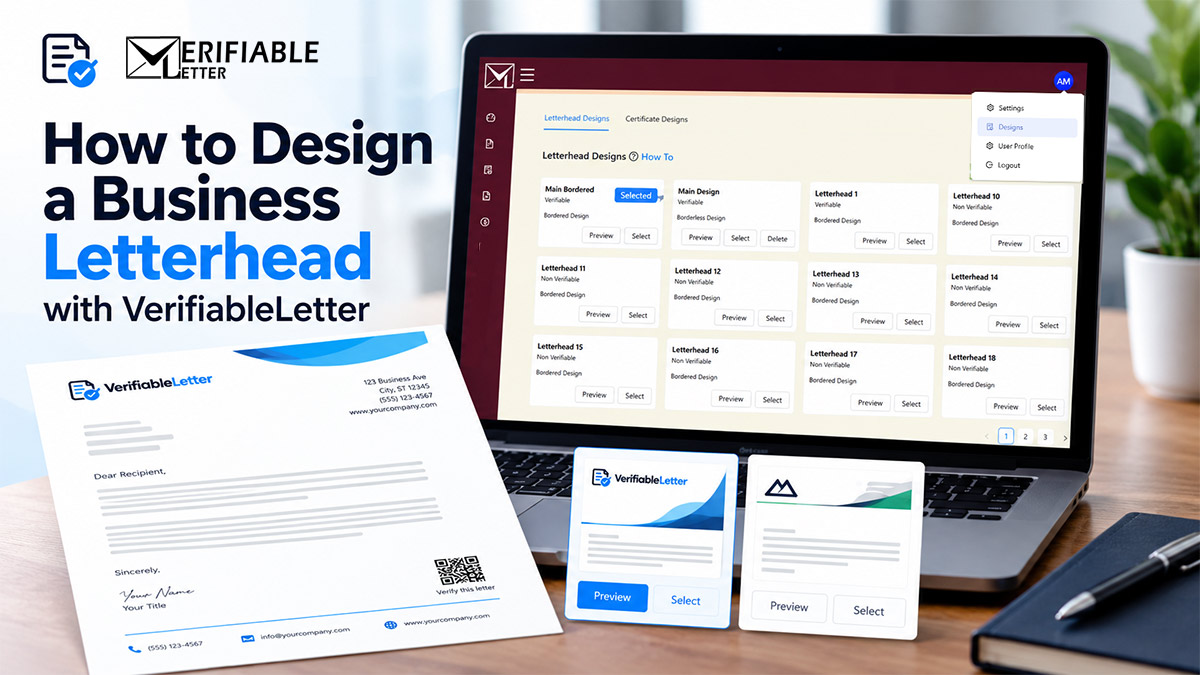
The quickest way to get started is to select one of the standard letterhead designs available in your VerifiableLetter account.
Step 1: Open Your Settings
- Sign in to your VerifiableLetter account.
- Click your profile icon in the upper-right corner.
- Select Designs.
If you do not yet have an account, you can create a VerifiableLetter account and get started.
Step 2: Find Letterhead Designs
On the Designs page, Letterhead Designs section is displayed by default. You can select Certificate Designs for your branded Certificates too.
VerifiableLetter provides different business letterhead layouts that determine how elements such as your company logo, business information, and document verification information are presented.
You can also view more information about professional business letterhead designs available through VerifiableLetter.
Step 3: Preview a Letterhead Design
Select Preview for a design before choosing it. Previewing helps you see how your organization’s information and branding will appear on the letterhead.
Compare the available layouts and consider which one best represents your company’s brand and the types of correspondence you normally send.
Step 4: Select Your Business Letterhead
When you find a design you like, click Select to make it your active letterhead design.
You can now use the selected design when creating correspondence through VerifiableLetter.
Option 2: Design a Custom Business Letterhead
If your company already has an established letterhead or you want greater control over its appearance, you can create a custom letterhead using your own header and footer images.
Step 1: Create a New Letterhead Design
From the Letterhead Designs section of Designs, select Create New.
Enter a descriptive name for the design. A recognizable name is particularly helpful if your organization maintains multiple letterhead designs.
Step 2: Upload Your Header and Footer
Upload the images you want to use for your letterhead:
- Header image: Appears at the top of the letterhead.
- Footer image: Appears at the bottom of the letterhead.
If you need design ideas, see these letterhead header and footer examples to help you develop your own layout.
Recommended Image Specifications
- Format: PNG
- Maximum width: 850 pixels
- Maximum height: 200 pixels
Images exceeding these dimensions may be resized during upload. For the best result, prepare your header and footer at the appropriate dimensions before uploading them.
Step 3: Save and Select Your Custom Design
After uploading the header and footer images, select OK to save the new design.
Your custom design should now appear with the other available letterhead designs. Click Select to make it your active letterhead.
Preview Your Finished Business Letterhead
Always preview your letterhead before using it for official correspondence.
- Go to the Letters section.
- Create a new test letter.
- Add enough sample content to see how a normal business letter will appear.
- Select Preview from the Letter Edit page.
- Review the complete document, including the header, body, footer, business information, and verification elements.
Check the document at normal viewing size rather than looking only at an enlarged version. Your logo and contact information should remain clear and readable without competing with the actual content of the letter.
Tips for a Professional Business Letterhead Design
A business letterhead should reinforce your brand without distracting from the message being communicated. When preparing your design, consider these basic principles:
- Keep it simple. Avoid overcrowding the header or footer with unnecessary information.
- Use a high-quality logo. Blurry or pixelated graphics can make otherwise professional correspondence look poorly prepared.
- Maintain brand consistency. Use the same logo, colors, and visual identity that appear on your website and other official materials.
- Preserve enough white space. The content of the letter should remain the primary focus.
- Keep important information readable. Business names and contact information should remain legible when the document is viewed digitally or printed.
- Test before regular use. Preview the letterhead with both short and longer letters.
For additional design inspiration, see Adobe’s letterhead design resources.
Why Use VerifiableLetter for Business Letterhead?
A professional appearance is important, but modern business correspondence also needs to establish trust.
VerifiableLetter combines online company letterhead with document verification. Letters created through the platform can contain a unique Letter or Document ID and QR code that give recipients a way to verify the correspondence.
This is especially useful because a professional-looking document alone does not establish that it actually originated from the business whose name and logo appear on it.
For a deeper explanation, read The Importance of Company Letterhead Security: Preventing Scams and Enhancing Business Reputation.
If your organization is deciding between traditional stationery and an online system, also see Online Letterhead vs. Pre-Printed Paper Letterhead.
Frequently Asked Questions About Business Letterhead Design
Can I use my existing business letterhead with VerifiableLetter?
Yes. If your organization already has a letterhead design, you can recreate its appearance by preparing suitable header and footer images and uploading them as a custom letterhead design.
What image format should I use for my custom letterhead?
PNG is recommended. Header and footer images should have a maximum width of 850 pixels and a maximum height of 200 pixels. Preparing the images at the appropriate dimensions before uploading generally produces the best result.
Do I need to design my own letterhead?
No. VerifiableLetter provides ready-made letterhead designs. You can preview the available options and select one without creating custom header and footer graphics.
Can I change my letterhead design later?
Yes. You can return to the Letterhead Designs section on Designs page and select another available design when your business requirements or branding change. Documents issued using previously selected design will not be affected, as long as they are marked as Mailed. Any document not in Mailed status, will reflect newly selected Design.
What should a professional business letterhead include?
A business letterhead commonly includes the organization’s name, logo, and relevant contact information. The exact information and layout depend on the organization, its branding requirements, and the purpose of its correspondence. Keep the design clean enough that the actual message remains the main focus.
What makes VerifiableLetter different from a regular letterhead template?
A conventional letterhead template primarily controls how a document looks. VerifiableLetter combines business letterhead with document management and verification features, giving recipients a way to check correspondence rather than relying only on the appearance of a logo or letterhead.
Start Designing Your Business Letterhead
You do not need complicated design software to create professional business correspondence. Start with one of VerifiableLetter’s ready-made designs or upload your own branded header and footer to reproduce your company’s established letterhead.
Once your design is ready, create a test letter, preview the finished document, and make any necessary adjustments before using it for official communication.
Ready to get started? Sign in or create a VerifiableLetter account and design your business letterhead.
For additional tutorials and support, visit the VerifiableLetter Community.
Comments (0)